Laptop Inventory Management for IT: Custody, Checkout, and Offboarding
Laptop inventory management is the specialty within IT inventory that most managers feel daily: company laptops move constantly, and “I think Alex still has it” is not a control. This guide is written for IT managers who need custody, checkout, and offboarding discipline—alongside Intune or Jamf, not instead of them.
What follows is an operational guide focused on IT custody jobs-to-be-done—checkout, transfer, and offboarding—alongside the tools you already use. If you are comparing tools for this, see our roundup of the best IT asset management software.
What good laptop inventory management looks like
You should be able to answer, in minutes:
- How many active company laptops exist?
- Who has each one right now?
- Which are in stock, repair, or retired?
- What must be reclaimed when someone leaves today?
If any answer requires three spreadsheets and a Slack poll, the process is the problem.
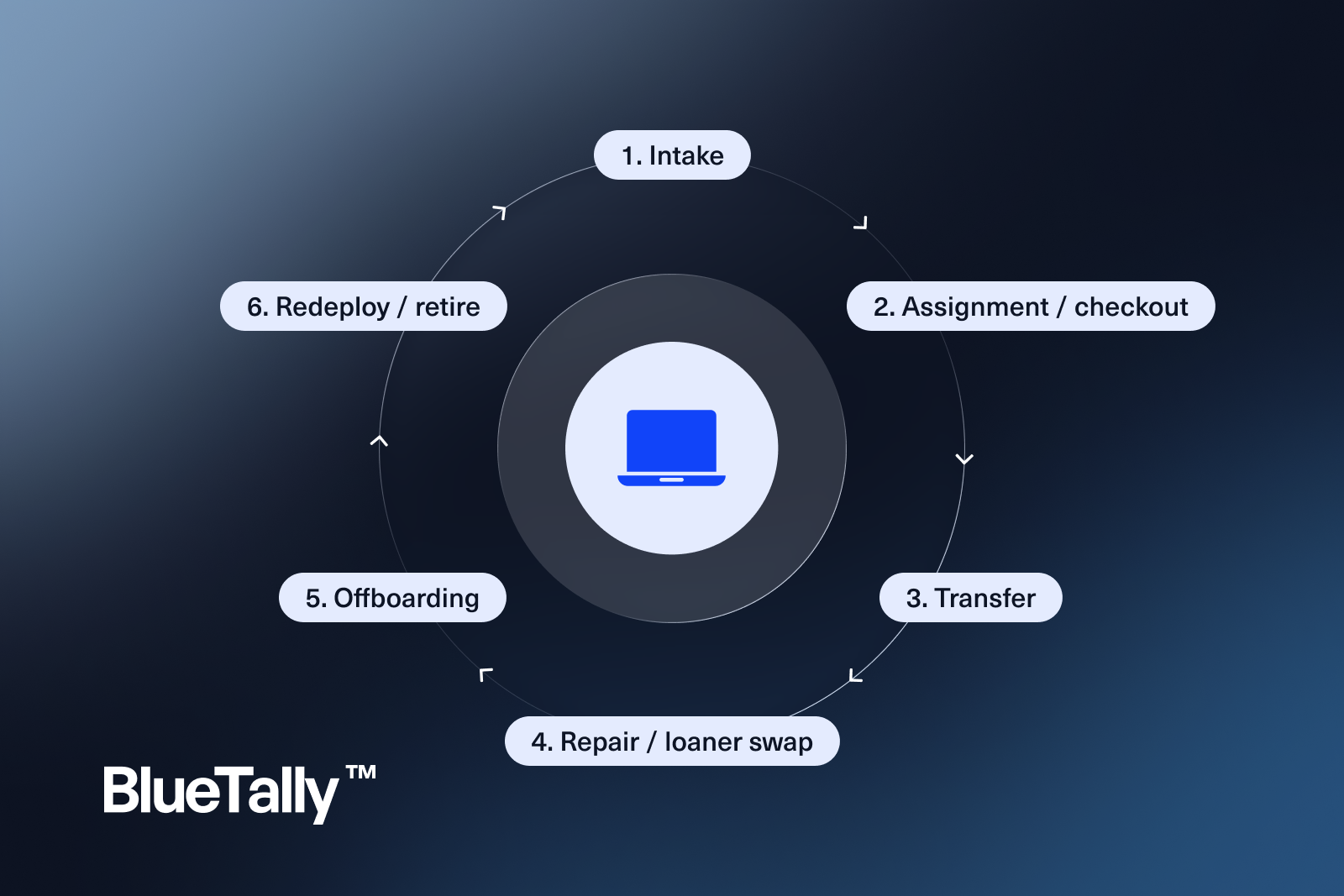
Core workflows
Intake
Record serial, model, purchase date, warranty, and asset tag. Enroll via Autopilot/Intune or Jamf as needed—and store the link between device identity and inventory record.
Assignment / checkout
Assign to a user or pool. Capture date and condition. For shared loaners, use explicit check-in/check-out.
Transfer
When laptops move between employees, transfer custody in the system the same day—do not wait for “later.”
Repair / loaner swap
Status changes prevent double-counting. Loaners need the same rigor as primary machines.
Offboarding
List every laptop (and charger/dock) tied to the person; confirm return; trigger wipe; update inventory; reclaim licenses tied to that identity.
Redeploy / retire
Wipe evidence, reassignment, or disposal documentation.
Laptop inventory and MDM
MDM answers: is the device enrolled, compliant, encrypted, and reachable?
Laptop inventory management answers: who is accountable, where is stock, and what is the custody history?
Best practice: sync MDM device facts into your inventory system of record. BlueTally is built as that custody layer—MDM complement plus who-has-what, with License Intelligence when seats should be reclaimed with the laptop.
Avoid treating either system as a full substitute for the other.
Policies that make inventory stick
- No laptop leaves IT without an assignment record
- Unknown owner is an incident, not a status
- Offboarding cannot close without asset confirmation
- Refresh planning uses inventory reports, not memory
Metrics worth watching
- % of active laptops with an assigned owner
- Average days from exit to reclaim
- Stock levels by model (to stop panic buying)
- Warranty expirations in the next 90 days
Common failure modes
- Intune list treated as the only inventory
- Chargers and docks ignored until users are blocked
- Redeployed machines keeping the previous user’s soft association in tribal knowledge
- Annual physical counts with no weekly hygiene
FAQs
Do we need RFID for laptop inventory management?
Usually no for sub-500 IT. Process and a usable system beat exotic tracking hardware on day one.
How does this relate to broader hardware inventory?
Laptops are often the highest-risk, highest-volume subset. Nail laptop custody, then expand.
Laptop inventory management SOP (copy/adapt)
On receive: scan serial → create record → enroll MDM → shelf location.
On assign: user + date + condition + accessories checklist.
On transfer: dual acknowledgment (old user / new user) when possible.
On repair: status=repair; issue loaner with its own assignment.
On exit: inventory list → return appointment → wipe → stock or retire → license reclaim.
On refresh: report warranty/age → plan purchases against stock first.
Accessories are part of laptop inventory
Treat as related assets or checklist items:
- Charger / USB-C brick
- Dock
- Laptop bag (if company-issued)
- Privacy screen / keyboard if standard kit
Missing chargers create false “laptop shortages.”
Physical count strategy (lightweight)
Twice yearly:
- Export assigned laptops by site/remote
- Sample 10% for confirmation (photo of serial or MDM check-in)
- Investigate variances within two weeks
Full desk-to-desk counts rarely survive hybrid work; sampling plus MDM plus custody beats annual chaos.
Security overlays
Laptop inventory management supports security by ensuring:
- Lost/stolen status triggers MDM actions
- Returned devices are wiped before redeploy
- Exceptions (BYOD) are labeled so they are not confused with corporate fleet
Narrative for executives
Frame laptop inventory management as loss prevention + audit readiness + refresh efficiency—not as “IT wants another tool.” One recovered cohort of “missing” laptops usually funds the project story.
Role scripts
Help desk: create/update assignments; never delete history.
IT admin: manage statuses, MDM links, retirements.
Manager: confirm returns for direct reports.
Employee: acknowledge receipt on assign (optional but useful).
Exception handling
- BYOD: labeled, not mixed into corporate laptop counts
- Executive assistants holding spares: explicit pool ownership
- Long-term leave: status policy documented
- Stolen devices: status + MDM + ticket linkage
90-day maturity model
Days 1–30: data import + owner coverage >90%
Days 31–60: offboarding SLA live
Days 61–90: refresh report used for purchasing decisions
If owner coverage stalls below 90%, fix process before buying accessories scanners.
Ready to replace spreadsheet heroics for laptops? Review BlueTally plans, connect enrollment via Intune asset management, and keep broader endpoint coverage with computer inventory software.
Try it free for 14 days
Try BlueTally free for 14 days — the ITAM platform trusted by top IT teams. No credit card required.


